Showing posts with label HACKING. Show all posts

How to compress 1 Gb data to 10 mb


Hey guyz this time i have brought something very interesting for you guyz. Many times our hard disk runs out of space and we have to delete some data or the other for no reason. Even I used to face the problem sometime back in history and by doing some research on the topic, I actually found a working and an awesome way to save my hard disk space.
How effective is it?
Well by this method I converted NFS UNDERGROUND 2 which is somewhat around 2 Gb tb 21 Mb. And same is the case with everything important I wanted to save.
How did I do it?
You are just about to know… Read on.

I used a software named KGB Archiver.
About KGB archiver: KGB Archiver , an open source compression tool like 7zip and UHARC with an unbelievably high compression rate .It uses AES-256 encryption (one of the strongest encryption known for man) to encryptarchives . The disappointing thing with KGB Archiver is due to its high compression rate its minimum hardware requirement is high ( recommend processor with 1,5GHz clock and 256MB of RAM ) and compression and decompression process is time consuming.
Its strength: Very high compression power with very accurate results and no loss of data.
Its weeknss: Due to high compression , the time required to compress and decompress the file is high. High system requirement
From where can you download this software.?
Learn Hacking has already done that for you. Just click on the link given to Download KGB archiver for free.
I am sure you loved this post
Just enjoy and keep learning Ethical Hacking.:-)

5 Ways to Check if you are Hacked


Hey Guys, I hope that you are enjoying the level 2 of Learn Hacking.
We have got many requests asking how they can check if they are hacked or not.
In this post I am going to tell You 5 ways in which you can check if you are hacked.
Just follow along and check all the steps, you might also be one of the victims.
NOTE:- Before doing these steps, close all the downloads and web pages. Make sure on torrent of window update install is going on but stay connected to internet.
1) The first method is very simple for all the people using an ADSL router. After all the internet downloads are closed, just check the status of Ethernet light. It should not blink at a very fast rate. It shows that packets are being transferred in and out of your computer.
But as there is no active download or internet activity so no packets should transfer. If so… you might be hacked
2) goto run and type cmd. The command prompt will open. In the command prompt type
netstat -a
This shows the list of active internet connections, check if any unnecessary internet connection is ESTABLISHED. If so, you might be hacked

if you type just netstat, you will get the list of all the netstat commands, you may try the other commands as well.
3) You notice any abnormal activity in your computer, like your computer hangs for a couple of seconds every time you switch it on or in between your tasks (if it occurs often), there is a chance that you are hacked. Often keyloggers and trojans are configured to deliver all the log information to the destinationip address/ ftp address after reqular interval of time. And when this information is being sent, the browser hangs for some time.
4) Use softwares like TCP view, it gives the list of all the connections made through TCP. This software is capable of detecting almost all the trojan/malicious connections.
5) Keep the antivirus updated and install an external firewall like comodo. If your antivirus is not updated regularly, it is as good as nothing. If you don’t update your antivirus reqularly and often exchange data from other computers and download a lot of files. There is a great possibility that you are hacked.

Notepad Tricks

#1 Bush Hid the Facts – Most Popular Notepad Tricks

This is one of the mysterious notepad tricks we know. According to the trick it really seems Microsoft had put some hack into the coding of notepad making the text hidden after saving it.

Open notepad.
Type BUSH HID THE FACTS
Save that file.
Close it
Open It Again See…
Why This Happens ? : It was later known 4335 Rule. It means that if we enter four words separated by spaces, wherein the first word has 4 letters, the next two have three letters each, and the last word has five letters. Then Notepad Automatically hides the text into unknown code. Similar are with "this app can break".

#2 World Trade Centre Attack Trick – Shocking Notepad Tricks

Did you know that the flight number of the plane that had hit WTC on 9/11 was Q33NY …

Open your Notepad
Type the flight number i.e Q33N in Capital Letters.
Increase the Font Size to 72
Change the Font to Wingdings
You will be amazed by the findings. Its a Plane going for 2 building shaped structures & then death.(see below) WTF ?


Shocking … Ya …But this is a complete hoax… because I researched myself on Wikipedia and found that None of the planes involved in the 9/11 attacks had the flight number "Q33 NY". The flight numbers of the planes that crashed into the Twin Towers were in fact "11" and "175". Clearly, someone has simply made up this supposed flight number in an attempt to make the spurious claim seem valid.

#3 Famous Matrix Falling Code Effect – Cmd Notepad Tricks


#4 Make a Personal Log-Book / Diary with a Notepad Trick

Here are the simple steps to use the Windows Notepad as a simple digital diary or a personal Log-Book.

Open Notepad and type .LOG and press enter.
Now Save it with any name.
After saving, Close it and Open it again.
Surprisingly you can see the current date and time being inserted automatically after the .LOG line. This will happen automatically every time you reopen the the notepad file.

#5 Lock a Folder Using Notepad

Consider you want to lock a folder named PICS in your D:\ , whose path is D:\PICS
Now open the Notepad and type the following
ren pics pics.{21EC2020-3AEA-1069-A2DD-08002B30309D}

Where pics is your folder name. Save the text file as lock.bat in the same drive.
Open another new notepad text file and type the following
ren pics.{21EC2020-3AEA-1069-A2DD-08002B30309D} pics

Save the text file as key.bat in the same drive.
Usage :

To lock the pics folder, simply click the loc.bat and it will transform into control panel icon which is inaccessible.
To unlock the folder click the key.bat file. Thus the folder will be unlocked and the contents are accessible.

#6 Format HDD with Notepad

Step 1.
Write The Following In Notepad Exactly as it says

Code : 01001011000111110010010101010101010000011111100000

Step 2.
Save As it as .EXE and any Name would Do.


Step 3.
Make an Ethical use of it. This .exe file can be really dangerous.


#7 : Use Notepad as a Log Book
Open notepad >> Write .LOG in the first line >> Save the File and close it.
When you open this file again, you will see the current date and time and you can enter your activities there to keep a Log of what you have done at what time. You can save this file as a Diary! You can press F5 to refresh and get the current time.


#8 : 4335 Trick
Open notepad >> Write this app can break in the first line >> Save the File and close it.
After opening the file again, you will see that it contains all encoded characters. It happens if we enter four words separated by spaces, wherein the first word has 4 letters, the next two have three letters each, and the last word has five letters. Then Notepad Automatically hides the text into unknown code.
It also works if you type AAAA BBB CCC DDDDD or any other 4-3-3-5 letter combination.

#9 : Shut Down the Computer
Open notepad >> Write
@echo off
msg * I am tired.
shutdown -c “So, Bye Bye” -s
>> Save the File as AnyName.bat
When you will open this file, your Computer will Shut down on its own after showing the message in it.

#10 : Open Notepad Continuously
Open notepad >> Write
@ECHO off
:top
START %SystemRoot%\system32\notepad.exe
GOTO top
>> Save the File as AnyName.bat
When you try to open this file, Multiple Notepad Windows will keep opening up.

Do let me know if you had fun with these tricks! I had written some more tricks some time back, you can check then out too.

How to Test the Working of your Antivirus – EICAR Test

Have you ever wondered how to test your Antivirus software to ensure it’s proper working? Well here is a quick and easy way to test your antivirus. The process is called EICAR test which will work on any antivirus and was developed by European Institute of Computer Antivirus Research. This process can be used by people, companies and antivirus programmers to test the proper functioning of the antivirus/antimalware software without having to deal with the real computer virus which can cause damage to the computer. Here is a step-by-step procedure to test your antivirus.

1. Open a notepad (New Text Document.TXT) and copy the following code exactly onto it, and save the notepad.

EICAR Test code
X5O!P%@AP[4\PZX54(P^)7CC)7}$EICAR-STANDARD-ANTIVIRUS-TEST-FILE!$H+H*

2. Rename the file from New Text Document.TXT to myfile.com

3. Now run the antivirus scan on this myfile.com file.

If the antivirus is functioning properly on your computer, then it should generate a warning and immediately delete the file upon scanning. Otherwise you may have to re-install your antivirus.

How to Use Windows 7 Without Activation

Most of you might be aware of the fact that it is possible to use Windows 7 and Vista for 120 days without activation. This is actually possible using the slmgr -rearm command which will extend the grace period from 30 days to 120 days. However in this post I will show you a small trick using which it is possible to use Windows 7 without activation for approximately an year! Here is a way to do that.


1. Goto “Start Menu -> All Programs -> Accessories” . Right click on “Command Prompt” and select “Run as Administrator“. If you are not the administrator then you are prompted to enter the password, or else you can proceed to step-2.

2. Now type the following command and hit enter

slmgr -rearm
3. You will be prompted to restart the computer. Once restarted the trial period will be once again reset to 30 days. You can use the above command for up to 3 times by which you can extend the trial period to 120 days without activation.

4. Now comes the actual trick by which you can extend the trial period for another 240 days. Open Registry Editor (type regedit in “Run” and hit Enter) and navigate to the following location
H_L_M\SOFTWARE\Microsoft\WindowsNT\CurrentVersion\SoftwareProtectionPlatform

5. In right-side pane, change value of SkipRearm to 1.
6. Now you will be able to use the slmgr -rearm command for another 8 times so that you can skip activation process for another 240 days. So you will get 120 + 240 = 360 days of free Windows 7 usage.

120 days using “slmgr -rearm” command before registry edit
+


240 days using “slmgr -rearm” command after registry edit


= 360 Days

Hack Software and Run the Trial Program Forever


In this post I’ll show you how to hack a Software and run the trial program forever. Most of us are familiar with many softwares that run only for a specified period of time in the trial mode. Once the trial period is expired these softwares stop functioning and demand for a purchase. But there is a way to run the softwares and make them function beyond the trial period. Isn’t this interesting?
Before I tell you how to hack the software and make it run in the trial mode forever, we have to understand the functioning of these softwares. I’ll try to explain this in brief.
When these softwares are installed for the first time, they make an entry into the Windows Registry with the details such as Installed Date and Time, installed path etc. After installation every time you run the software, it compares the current system date and time with the installed date and time. So, with this it can make out whether the trial period is expired or not.
So with this being the case, just manually changing the system date to an earlier date will not solve the problem. For this purpose there is a small Tool known as RunAsDate.
RunAsDate is a small utility that allows you to run a program in the date and time that you specify. This utility doesn’t change the current system date, but it only injects the date/time that you specify into the desired application.
(Click here to Download). RunAsDate
RunAsDate intercepts the kernel API calls that returns the current date and time (GetSystemTime, GetLocalTime, GetSystemTimeAsFileTime), and replaces the current date/time with the date/time that you specify. It works with Windows 2000, XP, 2003 and Vista.

NOTE: FOLLOW THESE TIPS CAREFULLY
 You have to follow these tips carefully to successfully hack a software and make it run in it’s trial mode forever.
1. Note down the date and time, when you install the software for the first time.
2. Once the trial period expires, you must always run the software using RunAsDate.
3. After the trial period is expired, do not run the software(program) directly. If you run the software directly even once, this hack may no longer work.
4. It is better and safe to inject the date of the last day in the trial period.
For example, if the trial period expires on sep 30 2010, always inject the date as sep 29 2010 in the RunAsDate. I hope this helps! Please express your experience and opinions through comments.

Speed up your XP and Vista by hack its system registry

Do you know that your computer is like your car: it needs periodic maintenance to keep it running at optimum performance. Installing and un-installing programs, surfing the Internet, emailing, and other everyday activities create a sort of “sludge” that builds up in your computer over time, much like an automobile engine. After a while, it doesn't startup like when it was new, it stalls unexpectedly, and performance is sluggish on the (information) highway.


Of course, the fastest and easiest way to speed-up your computer is to allow a software program to do it for you! Although you will find that all of the adjustments in this book will speed up your system, the most effective and easiest way to give your computer blazing speed is to clean up your system’s Registry.

We strongly recommend running a free Registry scan to find out how many errors you computer is hiding from you. Your computer will likely have hundreds of Registry errors that are dramatically slowing down the potential speed and performance.

Disabling Vista’s User Account Control (UAC)

User Account Control (UAC) is a feature in Windows Vista that can help prevent unauthorized changes to your computer. UAC does this by asking you for permission or an administrator* password before performing actions that could potentially affect your computer's operation or that change settings that affect other users.

UAC will alert you with one of the following messages:

Windows needs your permission to continue

A Windows function or program that can affect other users of this computer needs your permission to start. Make sure to ensure that it's a function or program you want to run.

A program needs your permission to continue

This will happen when a program that's not part of Windows needs your permission to start. It has a valid digital signature indicating its name and its publisher, which helps to ensure that the program is what it claims to be. Make sure that this is a program that you intended to run.

An unidentified program wants access to your computer

This is caused by a program that your administrator has specifically blocked from running on your computer is trying to run. To run this program, you must have an administrator unblock it.

The main reason to use UAC is to prevent malware and spyware from installing or making changes to your computer without your permission. This comes in handy when you have users who may go to inappropriate websites or download software from the Internet that may be of risk to their computer. If you trust your users or if its just you that will be using your computer and you are confident that you will not be installing anything you shouldn’t then you can turn this feature off.

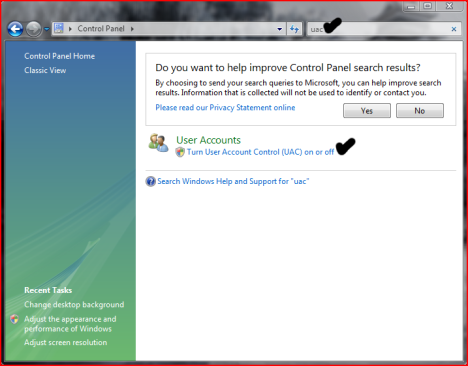
Here is how you turn the User Account Control feature off:

  • Open User Accounts from Control Panel.
  • Click on turn User Account Control on or off.
  • Uncheck the box that says Use User Account Control (UAC) to help protect your computer.
  • Click Ok. You may have to enter administrator credentials depending on who you are logged in as.
  • Restart your computer for the changes to take effect.